
How to Pay PESCO Bill Using QR Code | Quick & Secure Online Payment Guide
Paying electricity bills used to mean standing in long queues at banks or post offices, wasting time and energy. Today, things have changed for the better. The Peshawar Electric Supply Company (PESCO) has introduced modern billing solutions to make life easier for its consumers. One of the most convenient methods is the QR code bill payment system, which allows you to clear your bill in just a few taps on your smartphone.
With the rapid growth of digital payment methods in Pakistan, more and more people are switching to mobile apps and online banking instead of cash-based transactions. From JazzCash to Easypaisa, and even banking apps like HBL Konnect and Meezan Bank App, you now have multiple ways to pay your PESCO bill online without visiting a physical branch.
The QR code payment method is not just fast but also highly secure. By simply scanning the code printed on your PESCO electricity bill, you can instantly view your billing details and make the payment. No need to manually enter the consumer number, bill reference, or amount—everything is automated. This makes it a contactless, safe, and hassle-free way to manage your electricity expenses.
What is a QR Code on PESCO Bill?
If you’ve noticed a small black-and-white square on your PESCO electricity bill, that’s a QR code. This modern technology has become a game-changer in the world of utility payments. A QR code (Quick Response code) works like a digital shortcut—it stores all the important details about your bill, including your consumer number, bill amount, and due date. Instead of typing these details manually, you can simply scan the QR code with your smartphone to process the payment instantly.
To make bill payment easier, PESCO has integrated QR code scanning into its billing system. Now, every printed bill comes with a unique QR code that can be scanned through mobile banking apps and digital wallets such as JazzCash, Easypaisa, HBL Konnect, and Meezan Bank App. This step has made the payment experience smoother, faster, and far more convenient for consumers.
One of the biggest advantages of the PESCO QR code bill system is that it ensures contactless and secure transactions. There’s no risk of typing errors, and your payment is processed directly through verified banking platforms. Whether you are at home, in the office, or traveling, you can clear your dues with just a quick scan. This makes QR code electricity bill payment a reliable and time-saving solution for modern consumers.
Advantages of Paying PESCO Bill Using QR Code
Paying bills has never been this easy. With PESCO digital payment options, consumers no longer need to wait in long queues at banks or post offices. The QR code electricity bill payment system makes the process faster, smarter, and more reliable. Let’s look at some of the key benefits.
No Need to Visit Banks or Post Offices
Gone are the days when you had to take time out of your busy schedule just to pay a bill. Now, with the PESCO QR code bill, you can scan and pay PESCO bill instantly from the comfort of your home. Whether it’s late at night or during office hours, payments are possible anytime.
Instant Online Bill Payment Through Mobile Apps
The QR code payment system connects seamlessly with mobile banking apps and digital wallets. By just scanning the code, your payment details are fetched automatically, saving you from the hassle of entering numbers manually. This makes utility bill QR code payment quick and error-free.
Secure Transactions Regulated by the State Bank of Pakistan
When it comes to paying bills, security is a top priority. The QR code system is backed by secure digital channels and complies with State Bank of Pakistan regulations. This ensures that every transaction is safe, giving you peace of mind while making payments online.
Works with Popular Digital Wallets
Whether you use JazzCash, Easypaisa, HBL Konnect, or Meezan Bank App, all these platforms support PESCO QR code bill payments. This flexibility allows consumers to choose the method that best suits their needs, making the payment experience convenient for everyone.
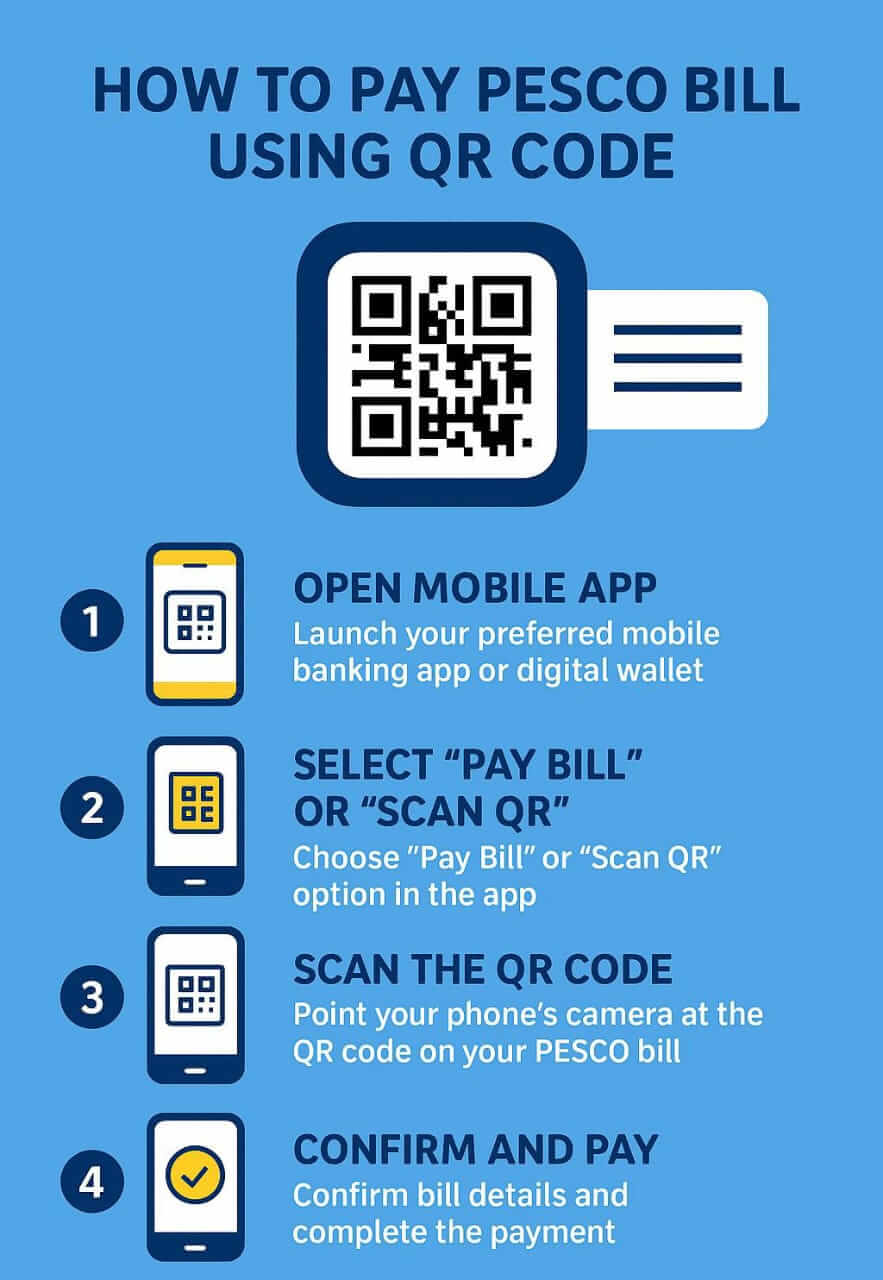
Step-by-Step Guide: How to Pay PESCO Bill Using QR Code
The process of paying your PESCO bill with a QR code scanner is simple and user-friendly. You don’t need to be tech-savvy to use this method—just follow these easy steps and your bill will be paid within minutes.
Step 1: Open Your Mobile Banking App or Digital Wallet
Start by unlocking your smartphone and opening the mobile app you use for payments. It could be JazzCash, Easypaisa, HBL Konnect, Meezan Bank App, or any other banking app that supports QR code electricity bill payment.
Step 2: Select “Pay Bill” or “Scan QR” Option
Once inside the app, look for the option that says “Pay Bill” or directly choose “Scan QR”. This option allows your phone’s camera to access the QR code on your PESCO bill.
Step 3: Scan the QR Code on Your PESCO Bill
Hold your phone over the printed PESCO QR code bill and let the scanner capture it. Within seconds, the app will fetch all your billing details automatically. This makes the process quick and error-free compared to entering numbers manually.
Step 4: Verify Bill Details
The app will display your consumer number, bill amount, and due date. Double-check this information to make sure it’s correct before proceeding. This step ensures that you are paying the right amount for the right account.
Step 5: Confirm and Complete Payment
Finally, click the Confirm button to authorize the transaction. Depending on your app, you may need to enter a PIN, fingerprint, or OTP (One-Time Password). Once confirmed, your payment is completed, and you’ll receive a receipt or notification instantly.
By following this step-by-step guide to pay PESCO bill online, you can handle your electricity payments with ease—saving both time and effort.
Supported Apps and Platforms for QR Code Payment
The best part about the PESCO QR code bill system is that it works with multiple digital wallets and banking apps, giving you flexibility and convenience. No matter which app you prefer, you can easily scan and pay PESCO bill within minutes. Let’s explore some of the most popular platforms.
JazzCash – How to Pay with QR
With JazzCash, paying your PESCO bill through QR code is quick and reliable. Open the app, select the “Scan QR” option, and point your camera at the QR code on your PESCO bill. The app will fetch your bill details instantly. Just confirm the amount and complete your payment in seconds.
Easypaisa – Simple Scan and Pay
Easypaisa makes QR code electricity bill payment straightforward for every user. After logging into the app, tap on “Scan to Pay”, and scan the code printed on your bill. Easypaisa automatically shows your consumer number and due amount, so all you have to do is confirm and pay.
HBL Konnect / HBL Mobile App
For those who use HBL Konnect or the HBL Mobile App, the process is equally simple. Open the app, go to Bill Payments, and choose the Scan QR option. Once scanned, the app will display your PESCO bill details. Confirm, pay, and you’re done—all without visiting the bank.
Meezan Bank App and Other Banking Apps
If you are a Meezan Bank customer, their mobile app also supports PESCO QR code bill payment. Just open the app, use the QR scanner, and verify your bill details before confirming. Similarly, other major banking apps in Pakistan have started offering QR code scanning features for utility bills, making the entire payment process smooth and hassle-free.
By using these supported apps and platforms, consumers can enjoy secure and instant transactions, avoiding long lines and saving valuable time.
Common Issues and Troubleshooting
While paying your PESCO bill using a QR code scanner is usually smooth and hassle-free, sometimes small issues may arise. Don’t worry—these are common and can be fixed with simple solutions. Here are a few problems you might face and how to handle them.
QR Code Not Scanning Properly
Sometimes, the QR code on your bill might not scan due to poor lighting, a scratched print, or a low-quality camera. Try cleaning your phone’s camera lens, adjusting the light, or holding the bill closer to the scanner. If the issue continues, you can always enter your consumer number manually in the app as a backup option.
Internet or App Connectivity Issues
A stable internet connection is required for secure bill payment methods in PESCO. If your app is not loading or the QR code scanner isn’t working, check your Wi-Fi or mobile data. Restarting the app often resolves temporary glitches. Also, make sure you are using the latest version of your digital wallet or banking app for smoother payments.
What to Do If Payment Fails but Money Is Deducted
In rare cases, you might face a situation where money is deducted from your account but the bill doesn’t show as paid. Don’t panic—this is usually a temporary issue. First, check your PESCO online bill status after a few hours. If it still shows unpaid, contact your bank or digital wallet support team with the transaction ID. They will confirm and adjust the payment. This ensures your money is safe and your PESCO QR code bill payment is properly processed.
By knowing how to fix these common issues, you can continue paying your PESCO bill without visiting the bank, enjoying the convenience of QR code technology.
Safety and Security Tips
While QR code electricity bill payment is fast and reliable, it’s always important to follow a few safety measures to protect your money and personal information. Here are some practical tips that every PESCO consumer should keep in mind.
Always Use Official Mobile Apps
Make sure you are using only official mobile banking apps or digital wallets like JazzCash, Easypaisa, HBL Konnect, or Meezan Bank App. These apps are regulated and secure, ensuring that your PESCO QR code bill payment is safe from fraud.
Avoid Third-Party or Fake QR Scanners
Never use random third-party QR scanner apps from unknown sources. Some of them may be unsafe and can compromise your data. Always scan the PESCO QR code bill directly from your trusted banking app or digital wallet.
Check Transaction Receipts After Payment
After you scan and pay your PESCO bill, always save the digital receipt or transaction ID. This acts as proof of payment in case there is any dispute or system delay. Most apps provide instant SMS or in-app confirmation.
Verify Payment Through PESCO Online Bill Check
Once your payment is complete, you can double-check it by performing a PESCO online bill check. This ensures your payment has been updated against your account and you won’t face any last-minute surprises before the due date.
By following these secure bill payment methods for PESCO, you can enjoy the convenience of QR code payments with complete peace of mind.
FAQs
How do I scan the QR code on my PESCO bill?
To scan the QR code on your PESCO bill, simply open your mobile banking app or digital wallet and select the “Scan QR” option. Point your phone’s camera at the printed QR code, and the app will automatically fetch your bill details like consumer number, due date, and amount. Confirm the details and complete your payment within seconds.
Can I pay my PESCO bill with JazzCash or Easypaisa QR code option?
Yes, both JazzCash and Easypaisa fully support PESCO QR code bill payments. Just log into your app, use the scan and pay feature, and your bill will be settled instantly without needing to visit a bank or post office.
Is QR code bill payment safe and reliable?
Absolutely. The PESCO QR code electricity bill payment system is secure and backed by State Bank of Pakistan–regulated platforms like JazzCash, Easypaisa, and bank apps. Every transaction is encrypted, and you always receive a confirmation receipt for your records, making it both safe and reliable.
What happens if the QR code is not readable?
If the QR code on your PESCO bill doesn’t scan properly, it might be due to poor print quality, low lighting, or camera issues. In that case, you can still pay your bill by manually entering your consumer number in your banking or wallet app.
Can I still pay manually if the QR code doesn’t work?
Yes, even if the QR code scanner for bill payment fails, you can always pay your PESCO bill online by entering your consumer number and bill reference manually in the app. The QR code is just a shortcut to make payments easier, but manual options remain available.
Conclusion
Paying your PESCO bill with a QR code has made life easier for consumers. Instead of waiting in long queues or filling out manual forms, you can now settle your electricity dues in just a few taps. The process is simple, fast, and secure, thanks to digital wallets and banking apps like JazzCash, Easypaisa, HBL Konnect, and Meezan Bank App.
Switching to digital payment options not only saves time but also gives you peace of mind with instant confirmations and secure transactions. No more rushing to banks before closing time—your payment can be made anytime, anywhere.
So, the next time your electricity bill arrives, skip the hassle and go smart: just scan and pay instantly with the QR code on your PESCO bill!